Orchestra 5
Product description — valid from Orchestra 5.3.0.0.
Integration in IT and OT
Connectivity is the success factor for a scalable use of data. It forms the basis for the digital transformation of industry. To this day, many companies are still failing due to the complex and expensive implementation. Medium-sized companies in particular need simple and scalable solutions in order to economically establish the bases for Industry 4.0.
Orchestra revolutionizes seamless data connectivity. The platform is the economical and scalable solution for comprehensive data integration, data transformation and process automation. Orchestra is an essential basis for AI, automation and data space initiatives. Ready-made standard solutions, best practice templates, AI support and the intuitive low-code approach make Orchestra suitable for beginners without programming knowledge as well as for experienced experts.
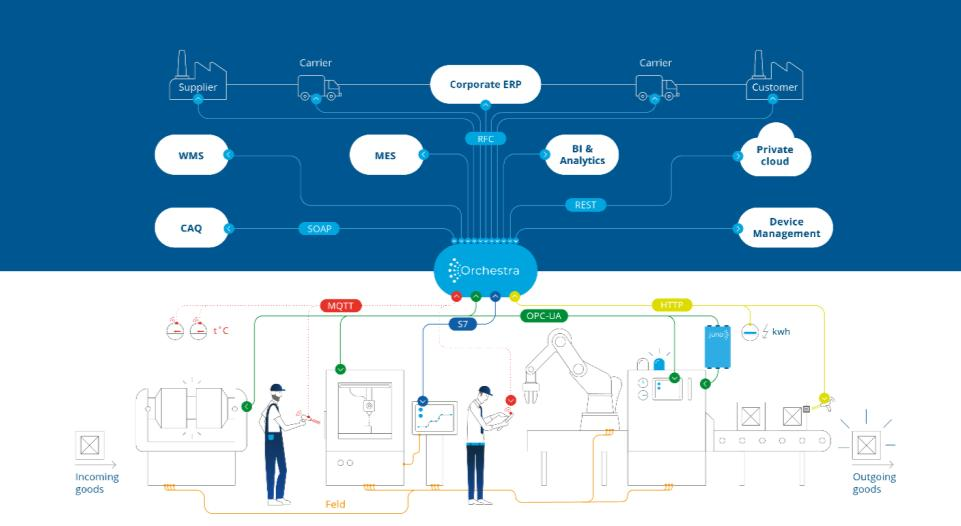
Figure 1: Horizontal and vertical integration across all levels with Orchestra
Orchestra is suitable for GMP and security-critical applications as well as all other industry applications. A robust solution that supports regulatory compliance, increases efficiency and drives innovation. Its modular design and scalability make it the perfect choice for any mid-sized organization looking to future-proof their integration processes. By supporting legacy systems and state-of-the-art technologies, Orchestra ensures that data is always accessible, reliably available and ready for use. Orchestra forms the backbone of digital transformation.
The "Swiss Army Knife"
Orchestra is the 'Swiss army knife' of integration. The platform is a flexible and multifunctional middleware solution for efficiently connecting heterogeneous systems. In IT and OT environments, it is often necessary to connect different data sources, databases, ERP systems or industrial machines and control systems (PLC). These systems generally use different formats and different protocols, which means that direct integration is not possible.
Orchestra makes it possible to overcome these challenges thanks to its ability to standardize, transform and harmonize data. It supports a wide range of communication protocols and data formats commonly used in IT and OT, including REST, OPC-UA, MQTT, Kafka, AMQP, MTConnect, JSON, XML, CSV and many more (see also Overview Adapter / Channel).
The use cases of Orchestra are unlimited, as these examples demonstrate:
- The integration of machines into a heterogeneous production environment - IT/OT integration. Thanks to protocol and data format support, Orchestra enables machine and plant manufacturers to integrate their own products into their customers' application environments. It ensures that different data sources and formats can be merged and processed without the need for complex adaptations to the systems involved.
- The import of data from different systems into the central solution of a service provider, such as the import of data from different sensors into a data lake. Orchestra provides a large number of protocols for data transfer, converts the data into the required format, validates it and ensures that it arrives correctly in the target system.
- As a result, data integrations with Orchestra usually expand over time. This results in heterogeneous integration scenarios that connect a large number of systems in IT and OT. This approach offers significant advantages compared to conventional point-to-point connectivity.
Orchestra as a scalable integration platform
Orchestra can substantially reduce the total number of interfaces. In contrast to conventional point-to-point connections, systems and machines are connected once and loosely coupled. This approach reduces complexity and effort in the long term.
Orchestra focuses on centralized, cross-system process control instead of user-specific, hard-coded scripts. Orchestra is modular, highly integrated and can connect almost all existing company applications. Orchestra minimizes the integration of new systems and machines.
Orchestra allows companies to modernize data integration by continuously connecting new applications or replacing existing ones. The use of publish/subscribe mechanisms for data communication separates applications more effectively than conventional point-to-point connections.
Orchestra's modular structure enables the integration platform to be easily expanded with additional components, such as BPMS for business process management, microservice architectures and event-driven architecture.
Orchestra offers and enables seamless integration into existing heterogeneous system architectures thanks to a variety of ready-to-use adapters / channels, depending on the requirements.
Orchestra in highly distributed architectures
The scalability of the Orchestra architecture enables flexible use in companies of all sizes - from small and medium-sized enterprises to global organizations. The solution allows the introduction of simple use cases and standardized approaches as well as the implementation of individual architectures with the highest demands on performance, security and much more.
As a low-code platform, Orchestra focuses on mostly code-free interface development and supports scalability, flexibility and all common architecture principles (e.g. unified namespace). This simplifies implementation and makes it easier to become familiar with and understand the interfaces and their maintainability. All components of Orchestra are designed to support the development, management and control of corresponding architectures in organizations.
Orchestra overview
Orchestra is an intuitive integration platform that helps to efficiently solve all connectivity-related challenges and tasks. The portfolio includes a range of applications and tools that enable the realization, introduction and operation of a data integration solution:
Orchestra Designer
Orchestra Designer is Orchestra's development environment. Thanks to an intuitive UI/UX and a low-code approach - "configuring instead of programming" - both beginners and experts can quickly and easily realize scalable solutions for challenging requirements. Without any programming knowledge. Since Orchestra version 5, Designer has been available as a web-based application (Web-Designer). This means it can be operated as a hosted application and offers users the opportunity to work collaboratively in a workspace.
In addition to the new, web-based version of Orchestra Designer, there is also a desktop version of Designer 5.0, which is comparable to the previous Designer (4.16 and earlier). The Classic-Designer is only being offered in a period of transition. The aim is to make it easier to switch from the Orchestra Desktop-Designer (up to 4.16.) to the Orchestra Web-Designer.
Modelling
Interfaces are represented in communication scenarios during modelling. Modelling takes place in Orchestra Designer - the development environment.
The components of a scenario are:
- Connectors (Orchestra Adapter / Channel)
- Data transformations (Orchestra mappings)
- Integration logic (Orchestra processes)
- Environment parameters (Orchestra Environment Entries)
Adapter / Channel (Connectors)
Orchestra is connected to external systems and machines via a large number of adapters / channels that support different communication protocols and formats. Basically, an adapter / channel is an Orchestra component that connects Orchestra with a specific type of external system or machine and acts as a translator that is able to exchange data with any external system. In order to realize the connection between external systems and machines with Orchestra, no programming knowledge is required, only the configuration of the suitable adapters / channels.
A detailed list of all adapters / channels can be found under Overview Adapter / Channel.
Mappings (data transformations)
When integrating heterogeneous systems, a central requirement is the transformation of data structures between different source and target systems. Even if systems use the same type of data, differences in the structure of the data, the data types, the semantics and the representation of the data are not uncommon.
In Orchestra, mappings can be defined that enable the transformation of different data types and formats.
The following mapping types are available:
- Graphical mapping
- XSLT mapping
- Procedural mapping (JAVA and XPath)
- Procedural mapping (JAVA and JSON-Path)
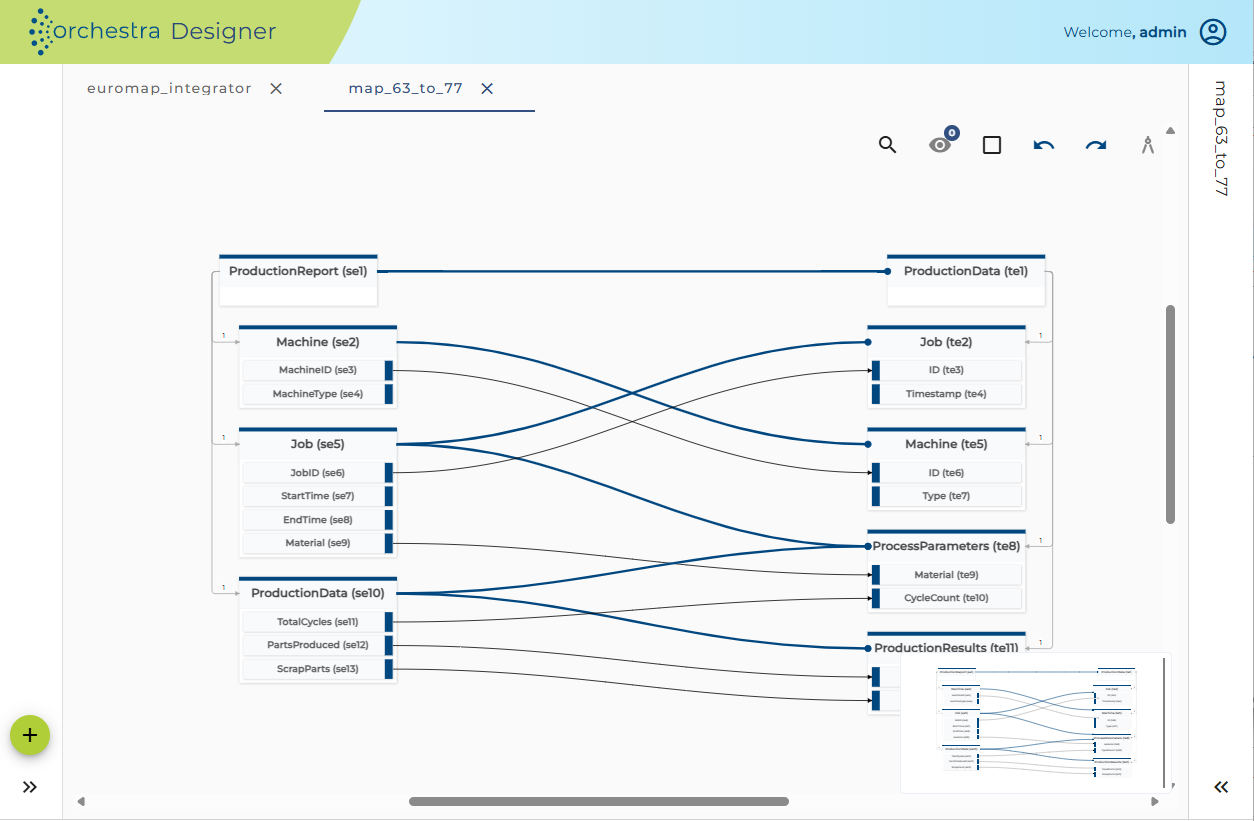
Figure 2: Data transformation with graphical mapping
Processes (integration logic)
The integration of heterogeneous systems often requires complex interaction between different systems. As there is no standardized or typical pattern that can be used, Orchestra chooses a flexible approach based on the standard notation BPMN. BPMN is a graphical language that can be used to define a flow of activities and tasks.
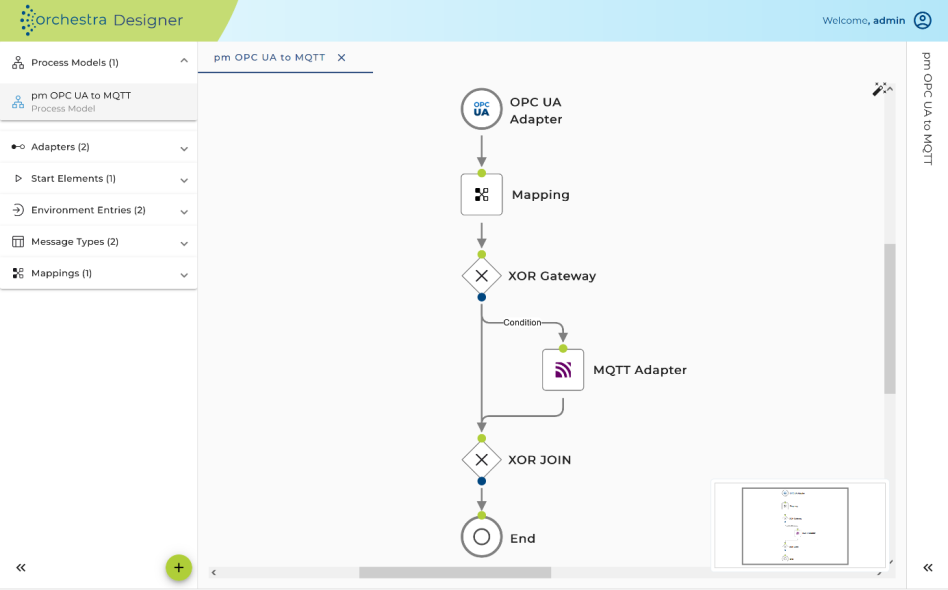
Figure 3: Modeling integration logic with Orchestra
Templates
Orchestra communication scenarios can be stored as templates in the Web Designer. These can contain various elements, such as adapters/channels, mappings, process models, etc. This means, user need to create integration solutions once, but can use and configure them often.
Templates can be used to map a large number of recurring use cases, e.g.
- Software integration: Providing data structures and preconfigured interface calls to make data available to a target system (e.g. ERP, CRM, MES, etc.)
- Machine connectivity: Providing data structures and preconfigured interface calls to read data from a source system (e.g. PLC)
- Alerting: Providing predefined notification routines for dedicated events via various channels such as email, SMS, messenger, etc.
Orchestra Projects
The scenarios created in Orchestra are organized into projects. This allows scenarios that belong together thematically or in terms of use cases to be grouped together and organized clearly. Furthermore, the project structure simplifies scenario versioning, collaborative work, and access authorization for the relevant scenarios.
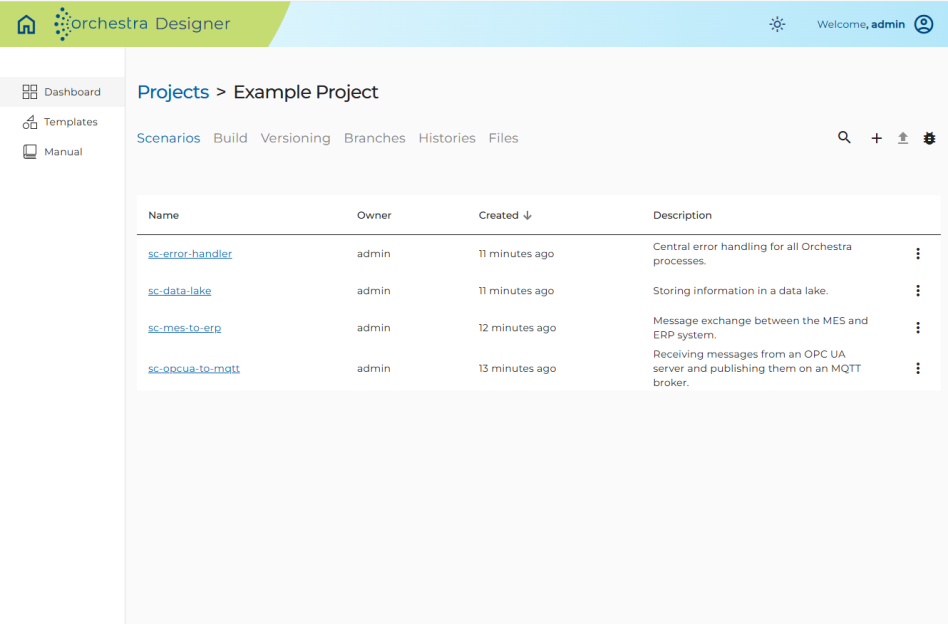
Figure 4: Organization of scenarios in projects.
Bundles
In Web Designer, multiple scenarios can be combined into a bundle and deployed as a single artifact to the runtime.
The bundles can be used as templates in the Solution Hub (see Chapter 3.4) and thus rolled out to distributed environments.
All environment entries contained in the bundle can be configured via a central configuration file.
Versioning via Git integration
With Git integration in Web-Designer, different scenario versions can be collaboratively developed and versioned. The different version statuses of the scenarios can be compared directly in Web-Designer and merged again if necessary. This ensures that you always have an overview of all changes and version statuses. The integration can be used with common GIT tools such as Github and Gitlab.
Dependency Management
With the help of Dependency Management in Web-Designer, dependencies between scenarios and scenario elements can be managed consistently and easily. This allows artifacts to be used in different versions and scenarios. Thanks to Dependency Management, dependencies can be tracked and adjusted at any time. This feature allows you to create extremely modular interface architectures.
Orchestra Bridge
Orchestra Bridge combines two important functions. Firstly, it enables the communication of locally available data with the hosted Web-Designer and secondly, it represents a completely autonomous component for test execution in the Web-Designer.
With the bridge, the elements configured in the web designer, such as environment entries, adapters / channels, mappings and process models, can already be tested at design time. The bridge enables the necessary access to local data for the tests, even if the web designer is hosted in the cloud, for example.
The Orchestra Bridge is a self-contained application that runs on the user's local system.
Orchestra Runtime & Monitor
Orchestra Runtime is used to execute the communication scenarios developed in Orchestra Designer productively.
As Orchestra is Java-based, it is platform-independent and can therefore be operated on any OS. This means that Orchestra can be used according to the respective requirements and architecture specifications. Edge-fog-cloud architectures can be realized easily and efficiently, for example.
Orchestra operating modes
Orchestra Runtime installations can be operated in the following modes:
- Standalone mode — The standalone installation is the standard Orchestra installation. An Orchestra node is responsible for the execution of all communication scenarios provided on this Orchestra runtime environment.
- Cluster mode — The cluster system is used when the Orchestra installation needs to be highly available. This allows two Orchestra nodes to work together and operate the same communication scenarios on different Orchestra nodes. If one node fails, the execution of the communication scenarios is shifted to the remaining nodes in order to process the open requests.
Cloud compatibility and network integration
Orchestra can be easily operated in a cloud infrastructure, which enables flexibility and scalability.
For ideal use in the cloud, it offers a mechanism for extending the adapters / channels to other networks. This enables connection to private networks, other cloud platforms and various third-party networks.
A local Orchestra component is used to integrate third-party networks, which performs the following tasks:
- Initializing the connection
- Secure data transfer
Secure cell communication
Cell communication is a basic mechanism used for secure communication between distributed orchestra instances. The concept of cell communication is designed to be location-transparent. Therefore, there is no need to concern oneself with the physical distribution of the communication scenarios.
Cell communication can be configured for both standalone and cluster installations.
Orchestra monitor
The Orchestra Monitor is the graphical user interface of the Orchestra Runtime and enables browser-based access for monitoring and administration of the scenarios.
A different level is available in the monitor. Firstly, the business level, on which the technically relevant data can be tracked and managed. Secondly, the process level, on which processes, statuses and technical analyses can be tracked.
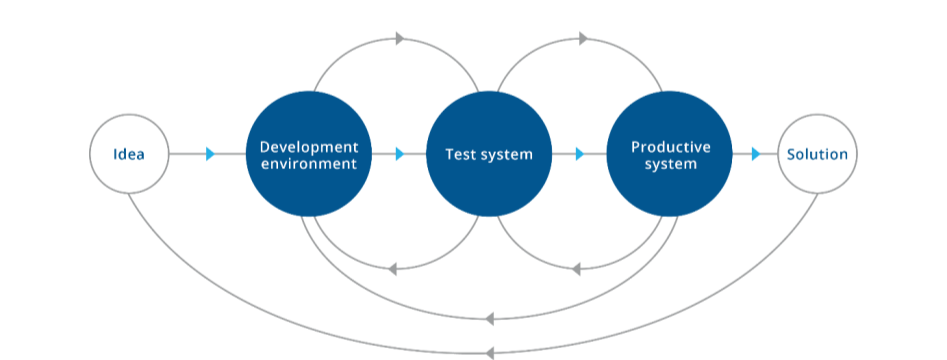
Figure 5: Flow logic
This separate representation of the system landscape and process logic is the basis for a consistent transport system.
Overview Adapter / Channel
Orchestra currently offers 94 "ready-to-use" adapters / channels as standard, which can be used straight away and only require configuration with regard to the systems and machines to be connected.
The following list shows the available adapters / channels:
| Name | Description |
|---|---|
| AMQP-Receiver | Receiving messages from an AMQP queue |
| AMQP-Sender | Sending messages to an AMQP queue |
| AS2 Client | Sending messages via AS2 |
| AS2 Server | AS2 server for receiving AS2 messages |
| Amazon S3 Object Reader | Lookup/Get Tags/List/Download Object operations in S3 Storage |
| Amazon S3 Object Writer | Upload/delete/copy object operations in S3 storage |
| Azure Blobstore Reader | Lookup/get tags/list/download object operations in Azure Storage |
| Azure Blobstore Writer | Upload/delete/copy object operations in Azure Storage |
| Azure IoT-Device Publisher | Transmitting messages to an Azure IoT device |
| Beckhoff ADS Listener (only available in the Web-Designer) | Monitoring of Beckhoff TwinCAT value changes via ADS protocol |
| Beckhoff ADS Reader (only available in the Web-Designer) | Reading variable values in Beckhoff TwinCAT via ADS protocol |
| Beckhoff ADS Writer (only available in the Web-Designer) | Writing variable values in Beckhoff TwinCAT via ADS protocol |
| Database BLOB Reader | Reading BLOB content from databases |
| Database Listener | Monitoring of database tables where data records fulfill certain criteria |
| Database Outbound | Executing SQL statements on a database |
| Database Reader | Reading messages from a database |
| Database Source Reader | Reading database table contents |
| Database Target | Changing database contents |
| Elasticsearch Reader | Reading Elasticsearch documents |
| Elasticsearch Writer | Writing Elasticsearch requests |
| E-Mail Listener | Monitoring an email account where emails meet certain criteria |
| E-Mail-Sender | Sending e-mails |
| FTP Channel | Reading and writing files and executing FTP commands on FTP servers |
| FTP Listener | Monitoring a path on the FTP server in which files fulfill certain criteria |
| File Listener | Monitoring of a local path on the server in which files fulfill certain criteria |
| Filename Listener | Checking changed file names |
| File Reader | Reading local files |
| File Writer | Writing local files |
| File Writer Mass-Mapper | Writing large files |
| File Operations Channel | Execution of commands at file level |
| HTTP Caller | Calling any HTTP methods. Message content, query parameters and HTTP headers can be provided. |
| HTTP GET Receiver | Receiving incoming HTTP calls with GET operation |
| HTTP File Streaming Server | Receiving incoming file streams from the HTTP File Streaming Client |
| HTTP Event Stream | Returns a stream of JSON objects in response of a HTTP GET invocation. |
| HTTP Streaming Client | Exchange of data with the HTTP File Streaming Server |
| HTTP POST Receiver (General) | Receiving incoming HTTP calls with POST operation |
| HTTP POST Receiver (Parameter) | Receiving incoming HTTP calls via POST operation with parameter |
| HTTP POST Sender | Sending outgoing POST messages |
| HTTP-Sender (Parameter) | Sending data via GET/POST |
| InfluxDB Outbound | Reading and changing data from InfluxDB |
| InfluxDB Reader | Reading data from InfluxDB |
| InfluxDB Writer | Inserting data into InfluxDB |
| Java Outbound | Executing Java code directly from Orchestra |
| Kafka Listener | Kafka-Consumer: Reading news from Kafka topics via pull model |
| Kafka Writer | Kafka-Producer: Publishing news in Kafka topics |
| LDAP-Reader | Reading data from an Active Directory |
| LDAP Writer | Writing and changing files in one Active Directory |
| LLM Adapter | Sending requests and receiving responses from various large language model (LLM) providers |
| LPD Listener | Receiving line print jobs |
| Message Queue Sender | Sending messages to a message queue |
| Message Queue Receiver | Receiving messages from a JMS message queue |
| Modbus Listener | Connect and read data periodically via Modbus |
| Modbus Reader | Connection and reading via Modbus |
| Modbus Writer | Connection and writing via Modbus |
| MongoDB Listener | Monitoring of changed data |
| MongoDB outbound | Execution of individual MongoDB operations |
| MongoDB reader | Reading data from MongoDB |
| MongoDB writer | Inserting, changing and deleting data in MongoDB |
| MQTT V3 Publisher | Publishing MQTT messages |
| MQTT V3 Subscription Channel | Subscribe to any topic and receive the relevant messages |
| MTConnect Listener | Connection with an MTConnect URL and regular query of new events |
| MTConnect Reader | Reading data via MTConnect |
| Multi File Reader | Reading multiple files |
| Nimmsta receiver | Receiving commands via the Nimmsta Websocket |
| Nimmsta-Sender | Sending commands to the Nimmsta web socket |
| OFTP2 File Sender | Sending messages via OFTP2 |
| OFTP2 File Receiver | Receiving OFTP2 messages |
| OPC UA Reader | Reading messages using OPC UA |
| OPC UA Writer | Writing node values to an OPC UA server |
| OPC UA Subscription Channel | Monitoring changes on OPC UA nodes (subscription) |
| OPC UA Event Subscription | Dynamic subscription of events on an OPC UA server |
| OPC UA Subscription (dynamic) | Dynamic subscription of variable nodes on an OPC UA server |
| OPC UA Dynamic Address Space Reader | Reading the structure of a remote OPC UA address space |
| OPC UA Dynamic Address Space Writer | Changing the structure of the address space of a local OPC UA server |
| OPC UA Dynamic Reader | Dynamic reading of nodes from an OPC UA server |
| OPC UA Dynamic Writer | Dynamic writing of nodes to an OPC UA server |
| OPC UA Event Sender | Dynamic sending of events on an OPC UA Server |
| OPC UA Method Caller | Dynamic invocation of OPC UA methods on a server |
| OS Process Executor | Calling external programs |
| OS Process Listener | Receiving data from an externally started program |
| Orchestra Object Receiver | Connects an external Java program with Orchestra based on a predefined client library |
| Orchestra Parameter Receiver | Establishes a connection between two Orchestra nodes and is used for data transfer between these distributed Orchestra instances |
| Orchestra Parameter Sender | Sending messages between two Orchestra instances using the HTTP protocol |
| PGP Crypter | Encrypting and decrypting messages using PGP |
| S7 Listener Channel | Receiving data from an S7 PLC |
| S7 Reader | Reading data from an S7 PLC |
| S7 Writer | Writing data to an S7 PLC |
| SAP RFC Caller | Sending outgoing SAP calls (RFC) |
| SAP RFC Receiver | Receipt of incoming SAP calls (RFC) |
| Serial Listener | Receiving data via a serial port |
| Serial Sender | Sending messages via the serial port |
| TCP sender | Sending messages via TCP/IP |
| TCP-Server | A TCP server that serves incoming TCP/IP connections in a user-defined way |
| WebDAV Listener | Receiving files that are sent via standard HTTP or WebDAV |
Further services are available for communication:
| Service | Description |
|---|---|
| REST Service Client | Calling external REST endpoints and sending messages and parameters via HTTP methods. In addition to manual integration, WADLs and OpenApi description files can be imported. |
| REST Service Provider | Provision of REST endpoints and receipt of messages and parameters via HTTP methods. In addition to manual implementation, WADLs and Open API description files can be imported. |
| SOAP Service Client | Calling external SOAP endpoints and sending messages and parameters via HTTP methods. In addition to manual integration, WSDLs can also be imported. |
| SOAP Service Provider | Provision of SOAP endpoints and receipt of messages and parameters via HTTP methods. In addition to manual implementation, WSDLs can be imported. |
| OPC UA Server | Open Platform Communications Unified Architecture (OPC UA) is a collection of automation standards for communication and data exchange in industry. |
| OPC DA | The OPC DA Gateway ensures seamless integration and data transfer between Orchestra and OPC DA. The standard components of Orchestra (static OPC UA) can be used for communication via the UA gateway. Please note that a separate license is required to use the UA gateway. If you are interested or require further information, please contact your account manager. |
| MCP (Model Context Protocol) Server | Orchestra acts as an MCP server, thereby supporting standardized connections to MCP clients such as compatible AI chat tools/LLMs (large language models) and AI agents. The MCP server in Orchestra is available in two versions. On the one hand, Orchestra Runtime (Monitor) has an MCP server, which allows the monitor's functions to be used with AI support and/or through AI agents. Furthermore, the MCP servers can be activated at the process model level in the Orchestra scenarios via "one-click." This allows all systems connected to Orchestra to be quickly and easily provided with LLMs and therefore also AI agents, whereby the Orchestra process models can be used to define in fine detail which of the data retrieved from the connected systems should be made available to the LLM and which should not. Note: This feature must be enabled before use. |
Further (additional) features and modules
A wide range of additional features, modules and add-on products are available for Orchestra. This means that Orchestra can be customized quickly and easily to the respective needs and requirements of a company at any time. The modularity of the features guarantees an optimal solution for the individual situation at all times.
Orchestra AI
Orchestra offers a range of AI features that can be enabled as add-ons.
Starting with version 5.3, Orchestra Runtime, Web-Designer, and Solution Hub support the integration of AI applications (e.g., Claude) via MCP. This integration allows users to benefit from numerous advantages when working with Orchestra:
- AI-based scenario creation
- AI-based mapping creation
- AI-based scenario analysis
- AI-based scenario documentation
- AI-based runtime analysis, including error analysis in active scenarios
- AI-based deployment of scenarios
- AI-based configuration of scenario templates and solutions
Orchestra AI requires that the user have a generative AI model implemented as an MCP client.
Orchestra Testing
This module is an extension for the Orchestra Designer.
The testing feature in Orchestra improves quality assurance and error identification and can also save time through simple test definition and repeatable tests. Tests can be created, managed and executed for complete communication scenarios, workflows and individual function modules.
Detailed information can be found in the Testing module description.
Orchestra Throttling
This module is an extension for Orchestra Runtime.
Ensuring system stability, protection against DDoS attacks, performance and security is central to the seamless operation of software applications and enterprise systems. The throttling module provides the ability to apply throttling rules at various levels, including input channels, communication scenarios and the entire system instance. This feature offers flexible configuration options and enables efficient control at different levels. Notifications can also be triggered when one of the defined rules has taken effect.
Detailed information can be found in the Throttling module description.
Orchestra Solution Hub
The Solution Hub is a stand-alone product that is compatible with Orchestra 5 Designer and Orchestra 5 Runtime.
The Solution Hub is a powerful and user-friendly tool that enables users to organize Orchestra communication scenarios, use them as solution templates and operate solutions derived from the templates on distributed Orchestra runtime architectures. An update mechanism for the solutions is also provided.
Solutions can be configured directly in the Solution Hub and rolled out on the desired Orchestra Runtime instances - knowledge of Orchestra Designer is not required.
Detailed information can be found in the Solution Hub product description.
Orchestra Distributed Monitoring
Distributed Monitoring is a stand-alone tool that is compatible with Orchestra 5 Runtime.
Distributed Monitoring is soffico's solution for monitoring distributed instances, especially in containerized landscapes. Developed as an optimal extension for Orchestra's current monitoring solution, this feature offers a centralized and comprehensive view of the relevant information. Centralized data storage in a high-performance time series database ensures maximum transparency and enables precise control of the operation of multiple Orchestra instances.
In addition to monitoring system events and process information, Orchestra provides a Prometheus metrics endpoint that provides the necessary system health and status information. This can also be displayed in the central dashboard. Various tools can be used in the overall solution, but we rely on a combination of Elastic Database, Prometheus and Grafana.
Orchestra Human Interaction
Orchestra Human Interaction is an innovative module for Orchestra. The module allows human actors (users) to be integrated into integrations (Orchestra scenarios) and to interact with them. The users do not need to have any knowledge of Orchestra (e.g. designer or runtime). Interaction takes place via a web frontend without direct interaction with Orchestra.
The interaction is defined by the Orchestra developer in the Orchestra Designer as "Human Tasks". The developer defines what type of interaction is required. Human interaction tasks are displayed in a separate web frontend.
As a rule, two central use cases are realized with the help of Human Interaction. Firstly, an employee or a group of employees start the process of an Orchestra scenario. Secondly, the process of an Orchestra scenario pauses and waits for an employee to decide how to continue. In both cases, data from a process can be viewed, transferred, or edited.
Detailed information can be found in the Human Interaction module description.
Orchestra Minifier
The Orchestra Minifier is an innovative module in Orchestra version 5.3 and later. The Orchestra Minifier is a CLI tool that can optimize the feature set of the Orchestra Runtime (Monitor). The result is a reduced, installable runtime artifact. The Orchestra Minifier can also be integrated into an automated pipeline.
In version 1.0, the Minifier can be used to remove components from the runtime, such as the Monitor, the runtime database, or unnecessary libraries.